Setting Up Secure Payment Redirects: PCI DSS Compliance and TLS Best Practises
Secure payment redirects play a critical role in protecting payment information and ensuring safe online payments, yet many businesses overlook the security risks.
Here at ServerMania, we understand the importance of secure payments, and everything starts with a reliable underlying infrastructure. Our eCommerce solutions, dedicated servers, and cloud platform provide the foundation needed for PCI DSS compliance initiatives and other critical security controls.
This guide is designed for e-Commerce store owners, developers, and IT administrators who want to build secure payment workflows that meet PCI standards. We cover how to configure secure payment redirects, implement HTTPS and TLS protections, validate redirect destinations, and strengthen payment workflows against fraud and unauthorized access.
What Are Secure Payment Redirects?
A secure payment redirect is a checkout process where an online merchant temporarily sends the customer to a trusted third-party payment provider to authorize a transaction.
Instead of collecting the payment information directly on the eCommerce website, the customer pays through a secure portal, protecting cardholder data and sensitive customer information.
This is the safest approach that many organizations use to enhance data security, reduce attack surface, decrease potential security problems, and support PCI DSS compliance. By limiting how payment details are handled, businesses reduce the risk of data breaches, improve customer trust, and simplify efforts to maintain compliance with industry regulations.
The 12 Requirements of PCI Compliance
The Payment Card Industry Data Security Standard (PCI DSS) is a security measure developed by the PCI Security Standards Council (PCI SSC). Any businesses that process or transmit cardholder data need to implement the clearly outlined security controls and reduce the risk of data breaches and theft.
- Set up and maintain a firewall to protect cardholder data.
- Don’t use vendor-supplied defaults for system passwords.
- Implement protection for stored cardholder account data.
- Encrypt the cardholder data transmission across networks.
- Install an antivirus to protect all the systems from malware.
- Develop and maintain protection systems and applications.
- Restrict the cardholder data based on business requirements.
- Verify only authorized personnel access to sensitive systems.
- Stop unauthorized physical access to payment environments.
- Use detection for suspicious behavior and security incidents.
- Regularly test security controls to identify weaknesses quickly.
- Always support the ongoing compliance and risk management.
Merchants minimize their legal and regulatory burden because the payment provider handles the strict security compliance standards. Also, the merchant never stores sensitive credit card data, significantly simplifying their PCI DSS compliance requirements. Merchants use redirects to offload the immense burden and liability of handling the sensitive payment card information directly on their own servers.
See Also: What Is PCI-Compliant Hosting
How Does Payment Redirects Work?
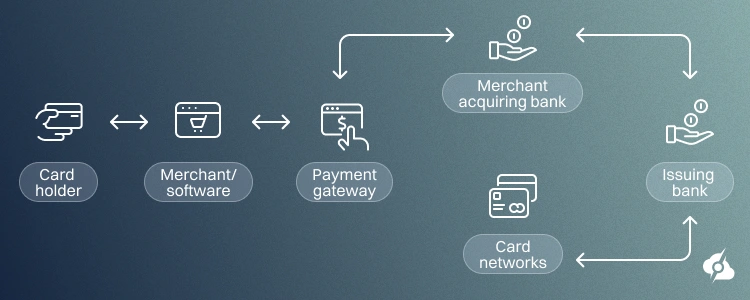
The payment redirect starts whenever a customer starts the payment process on the merchant’s website. The web server of the site creates a redirect and sends the user to a trusted payment provider, where a secure connection is created using HTTPS and an SSL certificate. The payment information is collected by the trusted provider in this safe environment, which protects the cardholder’s data and the information.
Once the payment transaction is complete, the trusted provider sends the customer back to the site with a verification response, allowing the business to confirm the transaction.
Common Payment Redirect Workflows
Most payment gateways use one of two common approaches:
- The first redirects customers to a hosted payment page where the provider handles the entire checkout process and sends the client back to the original website page.
- The second uses embedded payment forms that keep users on the merchant website while securely transmitting payment information to the payment processor.
Both methods help businesses process payments securely by reducing the exposure, but only when they’re properly configured. So, let’s jump into the redirects guide and learn how to set it up securely.
See Also: eCommerce Server Optimization
How to Configure Secure Payment Redirects
To set up and configure secure payment redirects, you need to make various tweaks on the local server as well as on your eCommerce platform. While many businesses avoid the high overhead of building, maintaining, and insuring a completely localized payment infrastructure via an all-in-one provider, we strongly advise going through the process manually.
We’ve made a few steps to walk you through the entire process.
Step 1: Choose a Secure Payment Gateway
The first step is to choose a secure payment gateway that meets the modern security and compliance standards. This provider (gateway) will become a critical part of the transaction process, handling the customer’s payment information, financial transactions, and cardholder data.
Specialized payment gateways assume the primary risk and handling of sensitive cardholder data. So, shoppers recognize established payment brands, which increases confidence during checkout. Also, these external gateways use advanced fraud detection and authentication protocols like 3D Secure.
Note: Shifting data entry to an externally hosted page drastically simplifies legal audit requirements.
Evaluate Security Features
Not all payment methods are the same, nor do they provide the same level of security. Businesses need to look into the advanced security measures, fraud detection tools, tokenization, and support for multi-factor authentication. So, when choosing or comparing providers, teams need to review how they secure the payment sessions, whether they monitor activity, and how they will respond whenever fraud occurs.
Note: Established gateways offer robust encryption and multi-factor authentication protocols to block unauthorized charges.
Verify PCI DSS Compliance
The payment gateway you choose must comply with the PCI DSS requirements. This compliance clearly demonstrates that the provider follows the industry security standards and can be trusted with protecting sensitive authentication data and cardholder information.
Did You Know❓
Asymmetric encryption, also known as public-key encryption, uses two keys: a public key for locking and a private key for unlocking the data, making it generally more secure than symmetric encryption.
TLS Support and Encryption
Good encryption protects sensitive customer data and financial transactions from unauthorized access, tampering, and theft, using symmetric and asymmetric encryption methods.
The payment gateway must also support modern encryption standards like TLS 1.2 and TLS 1.3 to be able to establish a secure connection between the client and the payment portal. This transitional phase is called a “TLS handshake“, a trusted certificate authority that validates the provider’s certificate, and allows businesses to verify the certificate chain, which securely connects the public key and private key.
Note: Payment gateway security is vital to guarding customers’ personal data and protecting companies from costly security breaches and compliance violations.
Step 2: Set Up Private Key, HTTPS & TLS
HTTPS and TLS will protect the cardholder data and payment information as it moves between the client and the website. This step is essential for covering the PCI DSS compliance and securing the payments on your website, so we’ve designed 3 steps to help you set it up.
Install a Valid SSL/TLS Certificate
The SSL certificate verifies the integrity of your website and enables encryption in all communications. To set it up, you need to generate a CSR (Certificate Signing Request) and then submit it to a trusted certificate authority authoity such as DigiCert, Sectigo, or Let’s Encrypt.
To generate your CSR and private key, use:
openssl req -new -newkey rsa:4096 -nodes -keyout domain.key -out domain.csrThis creates a public key and private key pair used to establish secure, encrypted sessions. Then, you need to install the certificate on NGINX:
server {
listen 443 ssl;
server_name example.com;

ssl_certificate /etc/ssl/certs/fullchain.pem;
ssl_certificate_key /etc/ssl/private/domain.key;
}
If you’re using Apache:
<VirtualHost *:443>
YourServerName yourwebsite.com

SSLEngine on
SSLCertificateFile /etc/ssl/certs/fullchain.pem
SSLCertificateKeyFile /etc/ssl/private/domain.key
</VirtualHost>Note: It’s crucial to ensure that your certificate chain includes all the intermediate certificates!
Force HTTPS Over Payment Pages
The next step is to ensure that all payment-related traffic uses HTTPS.
For NGINX:
server {
listen 80;
YourServerName yourwebsite.com;
return 301 https://$host$request_uri;
}
For Apache:
RewriteEngine On
RewriteCond %{HTTPS} off
RewriteRule ^(.*)$ https://%{HTTP_HOST}%{REQUEST_URI} [L,R=301]Note: Also verify that all images, scripts, and other HTTPS resources load securely to avoid mixed content warnings.
Enable HTTP Strict Transport Security
Another layer of protection you can add is through HTTP Strict Transport Security (HSTS), which forces browsers to access your website using HTTPS.
For NGINX:
add_header Strict-Transport-Security "max-age=31536000; includeSubDomains" always;For Apache:
Header always set Strict-Transport-Security "max-age=31536000; includeSubDomains"The Strict Transport Security header will help you prevent insecure connections and add another layer of protection for customer data. When you’re ready, make sure to disable outdated protocols and enable only TLS 1.2 and TLS 1.3. Here’s how:
For NGINX:
ssl_protocols TLSv1.2 TLSv1.3;For Apache:
SSLProtocol -all +TLSv1.2 +TLSv1.3That’s it. You have just satisfied the modern PCI DSS requirements.
Step 3: Create a Safe Payment Redirect Flow
Once HTTPS and TLS are set up, the next step is to build the actual payment redirect process. The flow will protect the cardholder data during the transaction and prevent unauthorized modifications. The steps below explain the process by using WooCommerce and WordPress as an example, so the concepts are easier to understand and apply, no matter the eCommerce platform.
Generate Redirect URLs Server-Side
The generation of payment gateways (URLs) happens through the payment extension. Many businesses using WooCommerce and WordPress use Stripe or PayPal. These integrations automatically generate a redirect URL on your server, which also prevents customers from modifying the transaction parameters.
So, through the eCommerce plugin, let’s take, for example, WooCommerce, go to Settings → Payments. In there, you need to select your payment gateway and connect your merchant account. Then you must see the “Checkout Redirects“, allowing you to safely redirect customers from the website to the portal.
Note: Sensitive payment information is handled on a dedicated, highly secure server, reassuring buyers that their financial data is fully protected.
Use Tokens Instead of Sensitive Data
One of the modern ways to secure payments is by using tokens instead of sensitive information. This will replace the data with temporary tokens, used to perform the transactions. For example, Stripe offers this functionality through the “Enable Request Buttons and Tokenization” section.
Tokens provide one-to-one replacements for primary account numbers kept outside the merchant’s server, meaning that if a hacker gains access to the tokens, they cannot be used to carry out fraudulent transactions or be reverse-engineered to reveal the original payment data.
The customer enters payment information on a secure checkout page, while the merchant receives only a temporary reference token used to complete the transaction.
Note: Feel free to explore other token service providers like Worldpay, VTS, Braintree Vault, etc…
Prevent URL Manipulation Processes
After configuring your payment gateway, verify that payment values cannot be modified through the URL. To do so, perform a test order by adding a product to the cart, proceeding to checkout, and inspecting the URL. You need to confirm that the totals, payment amunst and customer identifiers are not exposed as editable parameters. When ready, complete the transaction and inspect the logs for anything unusual.
Step 4: Validate the Redirect Destinations
A secure payment process is not only the transaction itself. You need to verify exactly where customers are being redirected and what happens after the transaction is complete. If you fail to validate redirects destination, you’re leaving a gap open for serious security problems, exposing the customers to phishing attacks, and resulting in non-compliance with payment security requirements.
Implement Redirect Allowlist
A redirect allowlist contains a predefined list of approved domains and URLs that your website can redirect users to. Instead of accepting any destination provided in a request, the application compares the URL against an approved list before allowing the redirect. Those settings are typically available in your eCommerce plugin, for example, WooCommerce → Settings → Payments.
Here’s an example allowlist:
| Approved Destination: | Purpose: |
|---|---|
| https://checkout.stripe.com | Hosted Stripe checkout |
| https://www.paypal.com | PayPal payment processing |
| https://yourstore.com/order-received | Successful payment return page |
| https://yourstore.com/payment-failed | Failed payment page |
You can expand or narrow down the allowlist to only trusted URLs, preventing any intervention with the payment processing phase of the order. You should also audit these destinations quarterly, especially after installing new payment plugins or making any necessary adjustments to your checkout workflow.
Prevent Open Vulnerabilities
Open redirects occur when attackers manipulate a redirect parameter and send customers to a malicious website. While this may sound unlikely, we strongly recommend checking for any open redirects, which will help you identify if your website can redirect to modified destinations.
How to Test for Open Redirects
- Start a test checkout.
- Check URLs containing:
- redirect=
- return_url=
- next=
- destination=
⚠️ Important: If the website redirects to the modified destination, you have discovered an open redirect vulnerability. Phishing scammers can mimic redirect pages, making it crucial for users to inspect the URL bar for proper HTTPS encryption and correct domain names.
Verify Return Payment URLs
If everything with your test order seems to be working as expected, lastly, you must verify whether the return URLs are working normally. To verify, use the following steps:
- Enable Sandbox Mode in your payment gateway.
- Add product to the cart and finish the transaction.
- Verify your customer lands on the expected page.
- Confirm that your order status changes correctly.
In addition, you can also review the logs, for instance, WooCommerce → Status → Logs, and check for any failed payment callbacks, unexpected HTTP requests, mismatches in the order IDs, or any duplicate transaction attempts. You should also test failed transactions, canceled ones, and even expired payment sessions to verify that every return path behaves correctly.
Did You Know ❓
Temporary redirects can lead to abandoned shopping carts or customer confusion. Some users exit the purchase if they feel confused or alarmed by leaving the original website. So, redirecting customers to their trusted bank or a familiar digital wallet increases their confidence because they can authorize the payment within a secure banking environment.
Step 5: Secure & Validate Payment Sessions
To secure your payment sessions completely, the final step is to protect user sessions, validate payment responses, and keep the environment safe. That’ll reduce the risk of unauthorized access and fraudulent transactions, and guarantee smooth payment processes.
Configure Website Secure Cookies
Cookies help maintain customer sessions throughout the checkout process. For payment pages, ensure cookies use the secure flag so they are transmitted only over HTTPS connections.
For WordPress, verify the cookie behavior after enabling SSL and test the checkout process in multiple browsers. We advise testing with Google Chrome, Mozilla Firefox, and Microsoft Edge as the leading browsers. Most modern e-Commerce platforms set up secure cookies automatically, but administrators should confirm that the settings are functioning correctly.
Enable Two-Factor Authentication
Administrative accounts often provide access to payment settings, customer records, and payment gateway configurations. Enabling multi-factor authentication helps prevent attackers from gaining access through stolen credentials.
For WordPress websites, install an MFA plugin and require additional verification for all administrator accounts. You should also enable MFA for hosting dashboards, payment gateway portals, and other critical services connected to payment processing.
Note: You should also inspect server logs to verify that the browser sends expected payment responses and that unexpected requests are not being processed.
Keep Systems Updated & Monitored
An outdated server software and eCommerce plugins often represent an attack surface for exploiters. So, always schedule the application of new security patches, payment extentions and web server. As part of regular reviews, inspect TLS settings such as Server Name Indication (SNI), and verify that certificates remain valid, and ensure payment integrations continue functioning after updates.
Big organizations and enterprises with significant annual global turnover often perform routine payment security audits, but even small businesses should review logs, monitor transaction activity, and check on any unusual behavior. This includes checking for duplicate transactions, suspicious payment attempts, and requests for unexpected other resources during the checkout process.
Testing your payment workflow periodically across different user agents, search engines, and browsers will help you identify issues before they impact customers or payment processing. Regularly monitoring payment systems and performing stress tests, such as vulnerability scans and penetration tests, can help assess the effectiveness of security measures and identify areas for improvement.
See Also: What Factors Impact E-Commerce Site Performance
Secure Payment Processing with ServerMania

Establishing secure payment processing begins with meeting all the industry standards, and the hosting infrastructure serves as the foundation for every security control.
If you’re processing a handful of transactions or supporting a fast-growing online store, ServerMania’s high-performance infrastructure helps improve performance without sacrificing safety. Our eCommerce Solutions, Dedicated Servers, and Cloud Services are designed with security in mind, allowing clients to adapt to the environment, deploy new features, and establish customers’ trust through full compliance.
If you have any questions, get in touch with our 24/7 customer support or book a free consultation with online payment experts to discuss your project. We’re available right now!
Was this page helpful?
About the author